BRUME
Overview
Brume is a standalone multi-timbral instrument built on a Raspberry Pi Compute Module 5. It runs four synthesis engines across four independent parts, each with six voices of polyphony (24 total), an SVF filter per voice, dedicated modulation routing, and a shared effects chain. The entire interface runs on a 10.1-inch touchscreen through a GEM-style windowed desktop, with no laptop or external computer required for operation.
The four engines correspond to four distinct approaches to electronic sound design: a dual-oscillator complex architecture with FM, AM, and wavefolding; an additive harmonic engine with spectral scanning; a triangle-core timbral engine with wave-multiplier shaping; and a granular engine that generates pitched clouds of micro-oscillator grains. Each engine occupies one of Brume's three parts, and any part can be switched between engines at runtime. Incoming MIDI can be routed to any combination of parts through a configurable channel map.
Interface
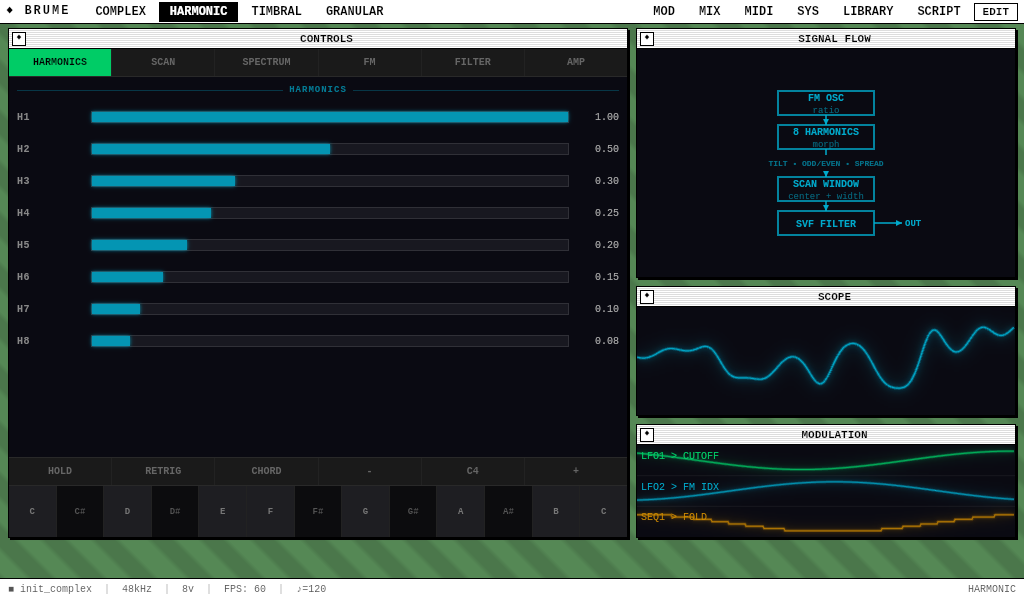
The top menu bar provides access to all pages: the four engine mode tabs (COMPLEX, HARMONIC, TIMBRAL, GRANULAR) on the left, and navigation pages (MOD, MIX, MIDI, SYS, LIBRARY) on the right. Tapping a mode tab selects that engine for editing on the synth page, while tapping a navigation tab switches to the corresponding full-screen view.
Each engine's synth page is divided into tabbed sections. Complex, for instance, has six tabs: OSC, MOD, FOLD, SHAPE, FILTER, and AMP. Parameter sliders respond to horizontal drag, and their values persist across tab switches. A touch keyboard at the bottom of the synth page provides direct note input with glissando, hold, retrigger, and chord modes.
Signal Path
Audio flows through the following chain for each voice, regardless of which engine is active:
All four parts render independently and are summed at the master bus, where a safety limiter with a -1 dB threshold prevents clipping before the signal reaches the DAC.
Synthesis Engines
Complex Oscillator
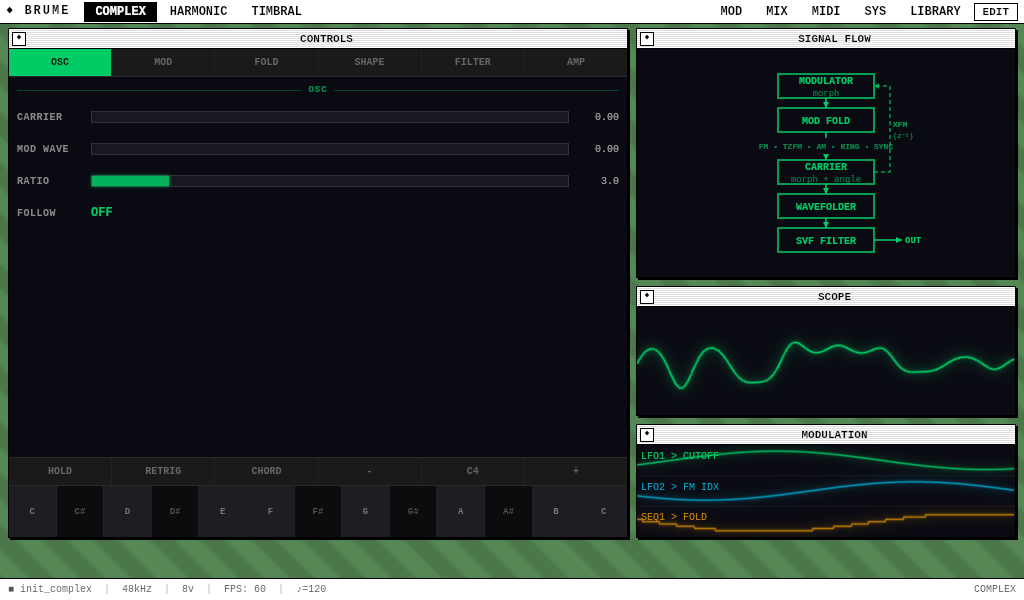
The Complex engine pairs a carrier and modulator oscillator, both capable of continuous waveshape morphing from sine through triangle, sawtooth, and square. The modulator feeds into the carrier through several modulation paths — phase-modulation FM, amplitude modulation, ring modulation, through-zero FM, and hard sync — while a cross-FM feedback path returns the carrier's output to the modulator for self-referential timbral complexity. Independent wavefolders on each oscillator and a phase-distortion stage round out the architecture.
OSC tab — Oscillator waveforms and frequency relationship
| Parameter | Range | Default | Description |
|---|---|---|---|
| CARRIER | 0 – 1 | 0 | Carrier waveform morph. Sweeps continuously from sine (0) through triangle (0.33), sawtooth (0.66), to square (1.0). |
| MOD WAVE | 0 – 1 | 0 | Modulator waveform morph, using the same sine-to-square progression as the carrier. |
| RATIO | 0.5 – 16 | 3.0 | Frequency ratio of modulator to carrier. Integer values (1, 2, 3) produce harmonic spectra; non-integer values create inharmonic, bell-like tones. |
| FOLLOW | off / on | off | When enabled, the modulator tracks the carrier's pitch with the ratio applied as a Hz offset rather than a multiplier, producing a fixed-interval detuning independent of pitch. |
MOD tab — Modulation paths between the two oscillators
| Parameter | Range | Default | Description |
|---|---|---|---|
| FM INDEX | 0 – 10 | 2.0 | Phase-modulation FM depth. The modulator's output displaces the carrier's phase, producing sidebands whose density increases with depth. |
| X-FM | 0 – 1 | 0 | Cross-FM feedback. The carrier's previous output feeds back into the modulator's phase, creating a self-referential modulation loop with chaotic character at higher values. |
| AM | 0 – 1 | 0 | Amplitude modulation depth. The modulator scales the carrier's amplitude between half and full, producing tremolo at low modulator frequencies and spectral sidebands at audio rates. |
| RING | 0 – 1 | 0 | Ring modulation depth. Crossfades between the clean carrier and the product of carrier and modulator, producing sum-and-difference frequencies with a metallic character. |
| TZFM | 0 – 1 | 0 | Through-zero FM depth. Modulates the carrier's instantaneous frequency bidirectionally, allowing it to pass through zero Hz and invert. Produces a tonal quality distinct from standard FM, particularly at moderate depths. |
| SYNC | off / on | off | Hard sync. Resets the carrier's phase to zero whenever the modulator completes a cycle, producing formant-like harmonics whose character changes with the frequency ratio. |
FOLD tab — Per-oscillator wavefolding
| Parameter | Range | Default | Description |
|---|---|---|---|
| CAR FOLD | 0 – 1 | 0 | Carrier wavefolder drive. Pushes the carrier's output through a triangle-fold circuit, reflecting the signal back at its boundaries to generate odd harmonics. |
| CAR STGS | 1 – 4 | 1 | Carrier fold stages. Each additional stage cascades another fold operation, progressively doubling the harmonic density of the output. |
| MOD FOLD | 0 – 1 | 0 | Modulator wavefolder drive. Applied before the modulator feeds into the carrier's FM path, enriching the modulation source with additional harmonics. |
| MOD STGS | 1 – 4 | 1 | Modulator fold stages. |
SHAPE tab — Phase distortion
| Parameter | Range | Default | Description |
|---|---|---|---|
| ANGLE | 0 – 1 | 0 | Phase distortion amount. Applies a power-law curve to the carrier's phase, compressing the rising portion of the waveform and stretching the falling portion. Introduces even harmonics and an asymmetric tonal quality. |
Harmonic Oscillator
The Harmonic engine generates sound through additive synthesis, combining eight individually controllable harmonics with spectral shaping tools. A Gaussian scanning window sweeps across the harmonic series, isolating or blending partials as its center and width change. Each harmonic can be morphed from sine to square, and an internal FM oscillator modulates the fundamental frequency, producing coherent spectral shifts across all eight partials simultaneously.
HARMONICS tab — Individual harmonic amplitudes
| Parameter | Range | Default | Description |
|---|---|---|---|
| H1 – H8 | 0 – 1 | 1.0 ↓ 0.08 | Amplitude of each harmonic, from the fundamental (H1) through the 8th partial. Defaults taper from 1.0 to 0.08, producing a triangle-like spectrum. Harmonics whose frequency exceeds the Nyquist limit are automatically suppressed. |
SCAN tab — Spectral scanning and waveform morph
| Parameter | Range | Default | Description |
|---|---|---|---|
| CENTER | 0 – 1 | 0.5 | Position of the scanning window across the harmonic series. At 0 the window centers on the fundamental; at 1 it centers on the 8th harmonic. Modulating this parameter with an LFO produces the animated timbral sweeps characteristic of scanning-style synthesis. |
| WIDTH | 0 – 1 | 1.0 | Width of the scanning window. At 0 only the harmonic nearest the center position is audible; at 1 all harmonics pass at their full amplitude. Intermediate values produce a Gaussian falloff from the center. |
| MORPH | 0 – 1 | 0 | Per-harmonic waveform morph, following the same sine-to-square progression as the Complex engine. The morph amount is coupled to the scan window: harmonics near the scan center receive more morph than those at the edges, creating a "bright focus" that moves with the scanner. |
| SPREAD | 0 – 1 | 0 | Phase randomization between harmonics. At 0 all harmonics are phase-locked, producing a consistent waveform on every cycle. Higher values introduce fixed but decorrelated phase offsets, thickening the sound without changing its spectral content. |
SPECTRUM tab — Spectral shaping
| Parameter | Range | Default | Description |
|---|---|---|---|
| TILT | -1 – 1 | 0 | Spectral tilt. Negative values emphasize lower harmonics for a darker timbre; positive values boost upper harmonics for brightness. The scaling is linear across the harmonic series. |
| ODD/EVN | 0 – 1 | 0.5 | Odd/even harmonic balance. At 0 only odd harmonics are present (square-wave-like spectrum); at 0.5 all harmonics contribute equally; at 1 only even harmonics remain. The fundamental is always preserved regardless of this setting. |
| INHARM | 0 – 1 | 0 | Inharmonic stretch. Applies a quadratic frequency offset to each partial, progressively detuning higher harmonics. At 0 the partials form a perfect harmonic series; higher values produce piano-like stretched tuning and, at extremes, metallic bell tones. |
FM tab — Internal frequency modulation
| Parameter | Range | Default | Description |
|---|---|---|---|
| FM DEP | 0 – 10 | 0 | FM depth applied to the fundamental. Because all eight harmonics derive from the fundamental, FM produces coherent spectral change across the entire series, with higher harmonics receiving proportionally more modulation. |
| FM RAT | 0.5 – 16 | 2.0 | Ratio of the internal FM oscillator to the fundamental frequency. |
Timbral Oscillator
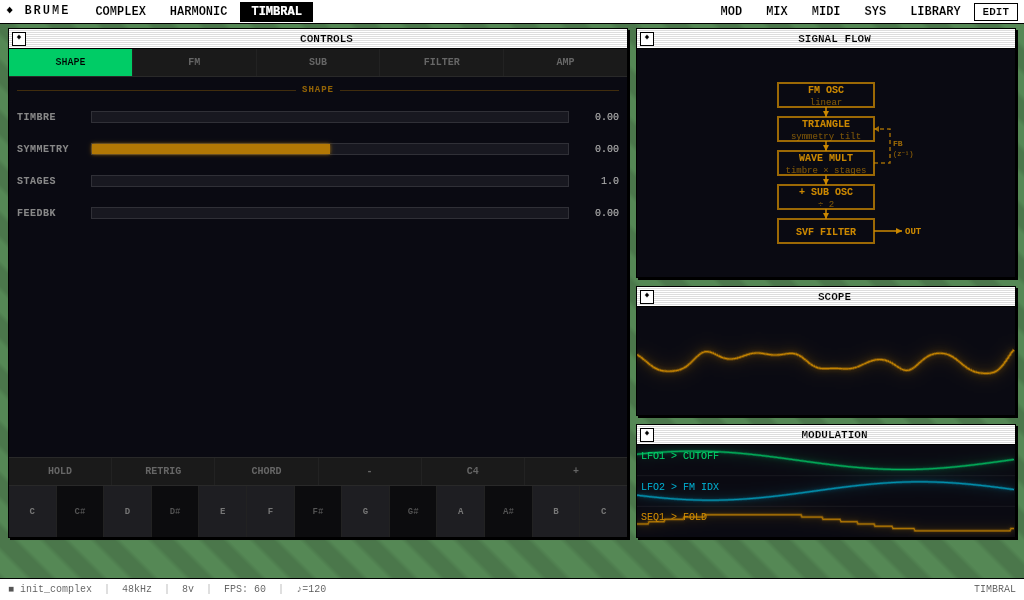
The Timbral engine starts from a triangle-wave core and shapes it through a wave-multiplier circuit that transitions from soft saturation to cascaded wavefolding as the timbre control increases. An expanded symmetry parameter tilts the triangle core before it enters the shaper, feeding different harmonic content into the multiplier depending on the tilt direction. The engine also provides linear FM, a sub-oscillator at half the fundamental frequency, and a self-modulation feedback path where the output feeds back into the oscillator's own frequency.
SHAPE tab — Wave multiplier and feedback
| Parameter | Range | Default | Description |
|---|---|---|---|
| TIMBRE | 0 – 1 | 0 | Wave multiplier drive. At 0 the output is a pure triangle. From 0 to 0.3 a soft-clip saturator rounds the peaks, adding warmth. Above 0.3 a triangle wavefolder blends in, and the crossfade between saturation and folding reaches full fold by 0.7. The progression from warm to metallic mirrors the behavior of Serge-style wave multiplier circuits. |
| SYMMETRY | -1 – 1 | 0 | Triangle tilt and asymmetric bias. Positive values stretch the rising slope and compress the falling slope, producing a ramp-like waveform; negative values produce the inverse. An additional quadratic bias term introduces even harmonics at any symmetry setting other than zero. |
| STAGES | 1 – 4 | 1 | Number of wavefolding stages in the multiplier. Each stage cascades another triangle-fold pass, densifying the harmonic spectrum. At four stages the output contains significant energy above the 15th harmonic. |
| FEEDBK | 0 – 1 | 0 | Self-modulation feedback. The oscillator's previous output sample modulates its own frequency, producing growling, chaotic textures at higher values. The feedback signal is clamped to keep the modulation proportional. |
FM tab — Linear frequency modulation
| Parameter | Range | Default | Description |
|---|---|---|---|
| FM DEP | 0 – 10 | 0 | Linear FM depth. Unlike the Complex engine's phase-modulation approach, the Timbral engine modulates the oscillator's instantaneous frequency directly, producing a different sideband distribution that preserves harmonic relationships at integer ratios. |
| FM RAT | 0.5 – 16 | 2.0 | FM modulator ratio to fundamental. |
SUB tab — Sub-oscillator
| Parameter | Range | Default | Description |
|---|---|---|---|
| SUB LVL | 0 – 1 | 0 | Sub-oscillator mix level. Blends a triangle wave at half the fundamental frequency into the output. At full level the mix is 50% main oscillator, 50% sub, adding low-end weight without introducing additional filtering. |
Granular Oscillator
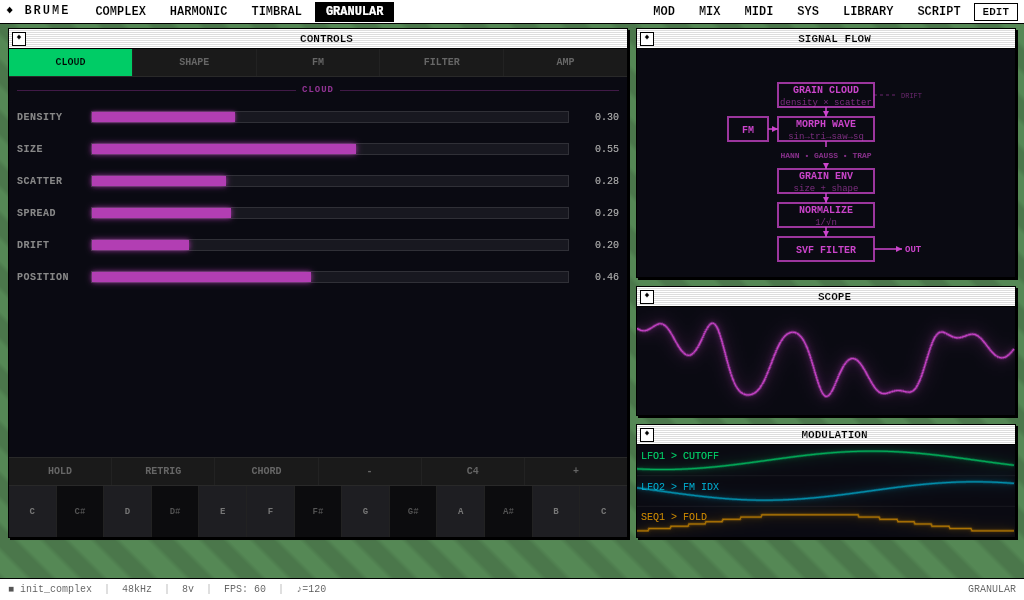
The Granular engine generates pitched clouds of micro-oscillator grains — short bursts of waveform output (1–500 ms) that overlap to produce evolving textures, shimmering pads, and atmospheric tones. Unlike sample-based granular systems that slice recorded audio, Brume's granular engine synthesizes each grain from scratch using the same morphable oscillator architecture as the Complex engine. A pool of 32 concurrent grains spawns continuously while a note is held, with each grain receiving its own randomized pitch, pan position, and waveform shape based on the scatter and spread parameters.
CLOUD tab — Grain generation and spatial distribution
| Parameter | Range | Default | Description |
|---|---|---|---|
| DENSITY | 0 – 1 | 0.3 | Grain spawn rate. Maps from 1 to 200 grains per second. At low values, individual grains are audible as discrete pulses; at high values they merge into a continuous cloud. Spawn timing includes a 30% jitter to prevent mechanical regularity. |
| SIZE | 0 – 1 | 0.2 | Grain duration. Maps from 1 ms to 500 ms. Short grains produce clicky, percussive textures; longer grains produce smoother, more sustained tones. Each grain's actual length varies by ±20% to avoid a periodic character. |
| SCATTER | 0 – 1 | 0 | Pitch randomization per grain. At zero all grains sound at the played note's frequency (unison). At maximum, each grain's pitch is randomized within ±2 octaves of the fundamental, producing diffuse, cloud-like textures. |
| SPREAD | 0 – 1 | 0 | Stereo pan randomization per grain. At zero all grains are centered; at maximum each grain is placed randomly across the full stereo field. |
| DRIFT | 0 – 1 | 0 | Slow pitch random walk applied to the base frequency before grain spawning. Creates gradual, organic pitch wandering across the entire cloud. The walk rate is approximately 0.3 Hz with a range of ±half an octave. |
| POSITION | 0 – 1 | 0 | Grain start phase offset. Controls where in the waveform cycle each grain begins. Sweeping this parameter produces a scanning effect through the waveshape, subtly changing the harmonic character of each grain's attack. |
SHAPE tab — Grain waveform and envelope
| Parameter | Range | Default | Description |
|---|---|---|---|
| MORPH | 0 – 1 | 0 | Grain waveform shape. Continuously morphs from sine (0) through triangle (0.33) and sawtooth (0.66) to square (1.0). Each grain captures the morph value at the moment it spawns, so sweeping morph while grains are active produces a cloud where different grains have different waveforms. |
| ENVELOPE | 0 – 1 | 0 | Grain envelope shape. At 0 the envelope is a Hann window (smooth cosine bell), producing gentle attack and release. At 0.5 it becomes Gaussian (tighter peak, more pronounced center). At 1.0 it becomes trapezoidal (quick attack, flat sustain, quick release), giving grains a harder, more percussive onset. |
FM tab — Per-grain frequency modulation
| Parameter | Range | Default | Description |
|---|---|---|---|
| FM DEP | 0 – 10 | 0 | FM depth applied to every grain via a shared modulator oscillator. At moderate depths this adds metallic, bell-like harmonics to each grain; at high depths the sound becomes noisy and inharmonic. |
| FM RAT | 0.5 – 16 | 2.0 | FM modulator ratio to the base frequency. Integer ratios produce harmonic sidebands; non-integer ratios produce inharmonic, metallic tones. |
Filter & Envelope
SVF Filter
Each voice includes a state-variable filter operating in lowpass mode, with a dedicated ADSR envelope that modulates the cutoff frequency. The filter and envelope parameters are identical across all four engines and are configured through the FILTER tab on each engine's synth page.
| Parameter | Range | Default | Description |
|---|---|---|---|
| CUTOFF | 20 – 20,000 Hz | varies | Filter cutoff frequency. The SVF topology provides a smooth resonant rolloff above this frequency. |
| RESO | 0 – 1 | 0.1 – 0.15 | Resonance. Boosts frequencies at the cutoff point. Values near 1.0 produce self-oscillation. |
| ENV DEP | 0 – 1 | 0.3 | Envelope depth. Controls how far the filter envelope modulates the cutoff above its static value. |
| F.ATK | 1 – 2,000 ms | 5 | Filter envelope attack time. |
| F.DEC | 1 – 5,000 ms | 300 | Filter envelope decay time. |
| F.SUS | 0 – 1 | 0 | Filter envelope sustain level, held while the note is active. |
| F.REL | 1 – 5,000 ms | 200 | Filter envelope release time, triggered by note-off. |
Amplitude Envelope
The AMP tab controls a standard ADSR envelope that gates the voice's output amplitude after all synthesis and filtering stages.
| Parameter | Range | Default | Description |
|---|---|---|---|
| ATTACK | 1 – 2,000 ms | 5 | Time from note-on to peak amplitude. |
| DECAY | 1 – 5,000 ms | 200 | Time from peak to sustain level. |
| SUSTAIN | 0 – 1 | 0.7 | Amplitude held while the note remains active. |
| RELEASE | 1 – 5,000 ms | 300 | Time from note-off to silence. |
Modulation
Each of Brume's parts has an independent modulation router with two LFOs and two step sequencers. These four sources can be assigned to any synthesis parameter through the MOD page, where each assignment specifies a source, destination, depth, and response shape. Multiple assignments can target the same parameter, and their offsets are summed before being applied.
LFOs
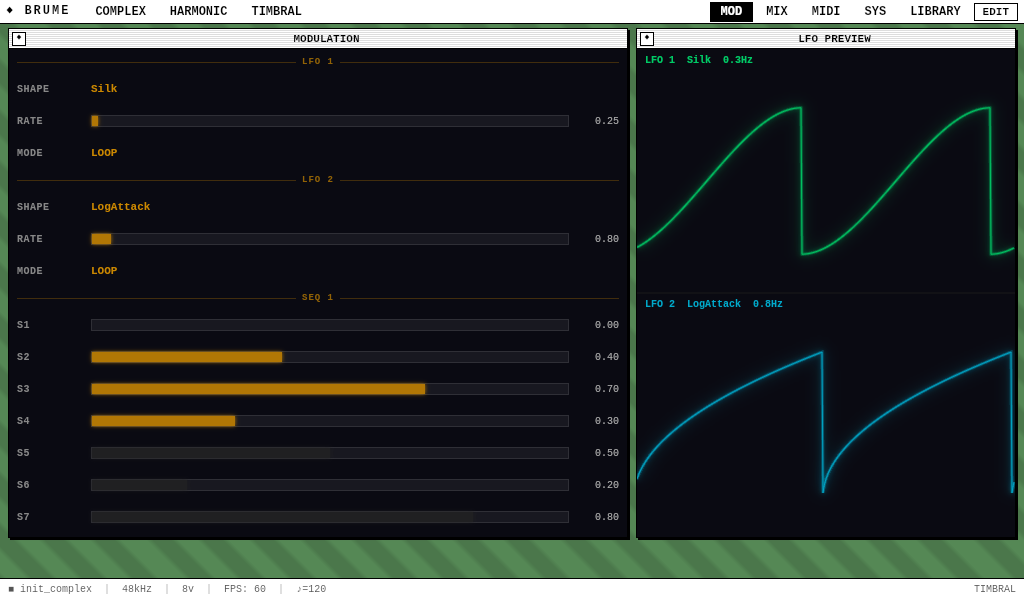
Both LFOs offer identical capabilities: a selectable waveform shape (drawn from a library of 24 transition curves), adjustable rate, and a mode switch between free-running loop and one-shot triggered playback. In loop mode the LFO cycles continuously regardless of note activity; in trigger mode it plays once from the beginning each time a note-on is received, then holds at its final value until the next trigger.
Step Sequencers
Each step sequencer holds between one and eight steps, where each step stores a normalized value from 0 to 1. The sequencer advances one step per trigger event, wrapping to the first step after completing the sequence. Four trigger modes determine when advancement occurs:
| Mode | Advances on |
|---|---|
| Note | Each note-on event (one step per note) |
| Beat | Quarter-note boundaries |
| Half | Eighth-note boundaries |
| Quarter | Sixteenth-note boundaries |
Routing Assignments
A modulation assignment connects one of the four sources (LFO1, LFO2, SEQ1, SEQ2) to any parameter in the current part. Each assignment has a bipolar depth control ranging from -1 to +1, where negative values invert the modulation source. A response shape — drawn from the same 24-shape library as the LFOs — can be applied to curve the source signal before depth scaling.
Shape Library
Brume's 24 transition shapes serve as both LFO waveforms and modulation response curves. Each shape maps a phase value (0 to 1) to an output value (0 to 1), with different mathematical curves producing different modulation characters.
Mixer
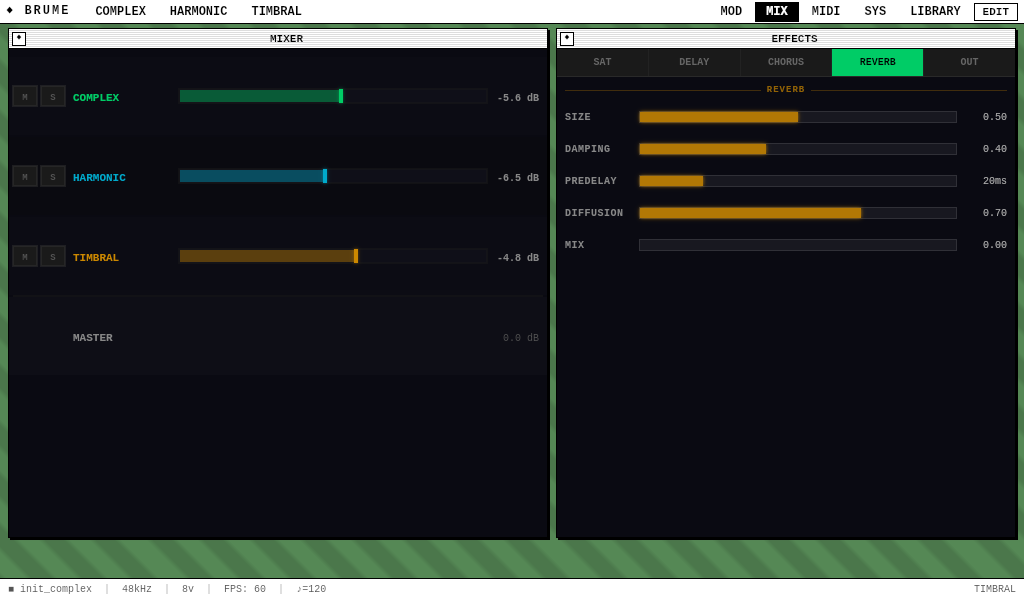
The MIX page provides a four-channel mixer with horizontal faders for each part (Complex, Harmonic, Timbral, Granular), along with mute and solo controls. Each part's level defaults to 0.8 and can be adjusted from 0 to 1. Each part also has independent delay and reverb send levels, which control how much of the part's signal reaches the shared delay and reverb buses. A master volume control governs the final output level before the limiter. All level changes are smoothed to prevent clicks.
Effects
The EFFECTS panel on the MIX page provides four processing stages organized as tabbed controls: Saturator, Chorus, Delay, and Reverb. Saturator and Chorus operate as inserts on the dry master bus, processing all parts equally. Delay and Reverb operate as send effects, where each part's independent send level controls how much signal reaches the effect. This architecture follows the model used in hardware instruments like the Elektron Digitone, where a dry bass line can coexist with a heavily reverbed pad without one treatment bleeding into the other.
Saturator
| Parameter | Range | Default | Description |
|---|---|---|---|
| TYPE | Soft / Hard / Tape / Tube | Soft | Saturation algorithm. Soft uses tanh waveshaping; Hard clips at ±1; Tape applies asymmetric soft clipping; Tube adds even harmonics via polynomial distortion. |
| DRIVE | 0 – 1 | 0 | Pre-gain into the saturation circuit. At 0 the signal passes clean; at 1 the input is boosted 5x before shaping. |
| MIX | 0 – 1 | 1 | Dry/wet blend. |
Chorus
| Parameter | Range | Default | Description |
|---|---|---|---|
| RATE | 0.1 – 5 Hz | 0.5 | LFO speed controlling the modulation of the internal delay lines. Left and right voices run at slightly offset rates for stereo width. |
| DEPTH | 0 – 1 | 0.3 | Modulation depth. Higher values produce more pronounced pitch variation and wider stereo field. |
| MIX | 0 – 1 | 0 | Dry/wet blend. |
Delay
The stereo delay supports both free-running millisecond timing and tempo-synced musical divisions. When a sync division is selected, the delay time auto-calculates from the transport BPM. The delay uses cross-channel ping-pong routing with a damping filter in the feedback path to darken successive repeats.
| Parameter | Range | Default | Description |
|---|---|---|---|
| SYNC | FREE / MIDI / 1/1 – 1/8t | FREE | Tempo sync mode. FREE uses the TIME slider directly. MIDI and the musical divisions (including dotted and triplet variants) derive the delay time from the current transport BPM. |
| TIME | 10 – 2000 ms | 300 | Delay time in free mode. Overridden when a sync division is active. |
| FEEDBACK | 0 – 0.95 | 0.3 | Amount of delayed signal fed back into the input. Values above 0.8 produce long, building repeats. |
| DAMPING | 0 – 1 | 0.3 | High-frequency rolloff in the feedback loop. At 0 the repeats stay bright; at 1 they darken rapidly, simulating tape degradation. |
| MIX | 0 – 1 | 0 | Dry/wet blend. |
Reverb
Four reverb algorithms are available, each built from networks of allpass diffusers and parallel comb filters with damped feedback. All algorithms share the same parameter set; the internal topology and delay lengths differ to produce distinct spatial characters.
| Parameter | Range | Default | Description |
|---|---|---|---|
| TYPE | Plate / Room / Hall / Spring | Plate | Plate (Dattorro): dense, bright, classic studio plate character. Room: shorter delays, clearer early reflections, intimate. Hall: long diffusion chains, expansive tail. Spring: allpass cascade with metallic chirp and resonant character. |
| PREDELAY | 0 – 200 ms | 20 | Delay before the reverb onset. Separates the dry signal from the reverb tail, preserving transient clarity at higher values. |
| DECAY | 0.1 – 8 | 2.0 | Reverb tail length. Controls the feedback coefficient in the comb filter network. Higher values produce longer, more sustained reverberation. |
| DAMPING | 0 – 1 | 0.4 | High-frequency absorption in the reverb tail. Low values produce bright, shimmering tails; high values simulate absorptive room surfaces. |
| MIX | 0 – 1 | 0 | Dry/wet blend. |
MIDI
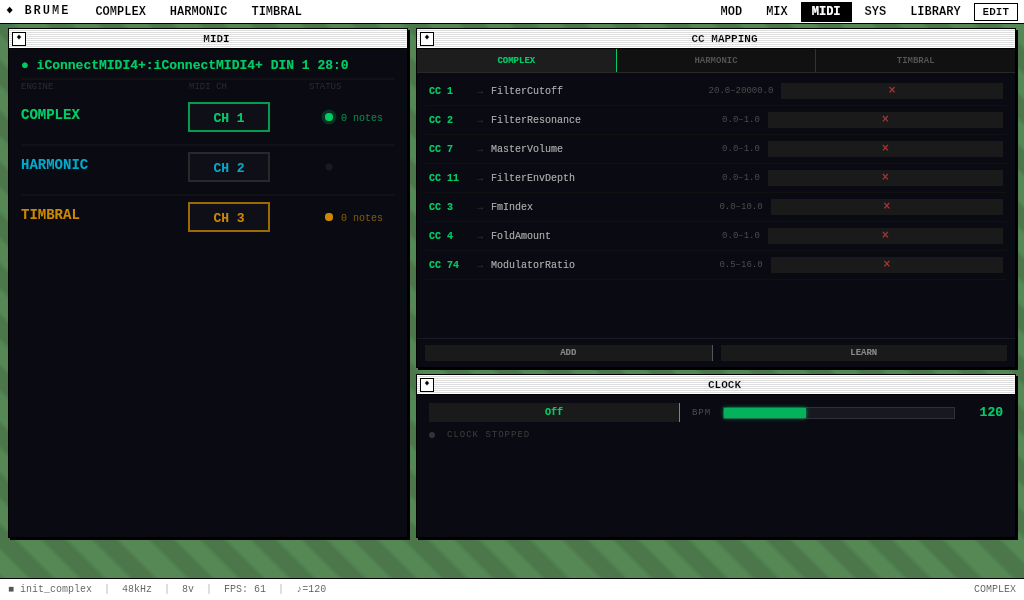
Brume receives MIDI over USB from any class-compliant device — control surfaces, keyboards, sequencers — and from the Meridian USB-C bridge to a host DAW (see below). All sources feed the same engine in parallel, so a controller plugged into a USB-A port and the DAW’s MIDI output over Meridian both reach Brume simultaneously without any routing setup. DIN 5-pin gear connects through any class-compliant USB-to-DIN bridge (e.g. iConnectMIDI4+).
The MIDI page has three sections: channel routing on the left (a part-centric list where each part shows its assigned MIDI channel; tap the channel box to cycle through CH 1–16 or NONE), CC mapping in the middle (the LEARN workflow plus the list of persisted CC→parameter bindings), and the clock controls on the right. Multiple parts can share the same channel for layered playback, and a single channel can be reassigned at any time without stopping playback.
Note-off messages use a promiscuous release strategy: when a note-off arrives on any part, Brume also releases that note on all other parts. This prevents stuck notes when channel assignments change during a performance. MIDI CC messages 120 (All Sound Off) and 123 (All Notes Off) are recognized and release all active voices on the targeted part.
CC Mapping — LEARN workflow
The CC MAPPING panel binds incoming MIDI CCs to Brume’s synthesis parameters. Brume ships with sensible defaults — CC 1 → Filter Cutoff, CC 2 → Filter Resonance, CC 7 → Master Volume, CC 11 → Filter Envelope Depth, plus a few part-specific bindings — and the LEARN workflow lets you add or override any binding directly from the touchscreen. No keyboard required.
| Action | Behavior |
|---|---|
| Tap LEARN | Arms capture mode. The button glows orange and an inline card appears at the top of the binding list reading “LISTENING FOR MIDI CC… (turn a knob or tap LEARN to cancel)”. |
| Move a knob / fader | Capture is continuous — the card updates to show the most recent CH / CC / value, so you can wiggle the intended control and confirm Brume sees the right one. Useful when DAW transport sync is also emitting CCs in the background. |
| Pick a destination | The card’s DESTINATION grid lists every parameter for the part the captured CC’s channel routes to (or every FX-slot parameter when an FX target is picked). Tap one to select; it highlights in the part color. |
| Tap SAVE BINDING | Writes the binding and disarms capture. The new mapping takes effect immediately. |
| Tap CANCEL | Discards the in-progress capture without writing anything. |
| Tap RESET | Two-tap confirm. Wipes all CC bindings, FX bindings, and channel routing back to factory defaults. Use when an experiment goes sideways. |
~/.brume/cc-bindings.json on every change and reloaded at startup. The file is human-readable; advanced users who need keyboard-typed CC numbers (touchscreen-only LEARN doesn’t expose a number pad) can edit it by hand over SSH.
Transport & Clock
The CLOCK window on the MIDI page controls Brume's internal transport, which drives tempo-synced delay divisions and step sequencer timing. Three clock modes determine how the transport derives its tempo:
| Mode | Behavior |
|---|---|
| Off | Internal clock at the configured BPM. No MIDI clock is sent or received. |
| Master | Internal clock at the configured BPM. Brume sends MIDI clock (24 PPQN) to connected devices. |
| Sync | Brume syncs to incoming MIDI clock messages. The BPM is estimated from the tick interval and smoothed to avoid jitter. MIDI Start, Stop, and Continue messages are recognized. |
The BPM slider ranges from 20 to 300 and affects all tempo-dependent features: delay sync divisions, step sequencer beat triggers, and future arpeggiator patterns. When the clock is in Sync mode, the BPM display shows the estimated tempo from the incoming MIDI clock source.
Meridian — USB-C to your DAW
A line you cross. Meridian is Brume’s integrated audio-and-MIDI bridge to a host computer — comparable in role to Elektron’s Overbridge for the Elektron range, but built on open USB class-compliant standards so it works on Mac, Windows, and Linux without proprietary drivers. A single USB-C cable carries 8-channel audio out, bidirectional MIDI, and MIDI clock simultaneously.
In a DAW, arm one or more audio tracks with Brume’s capture as the input, route MIDI out from a track to Brume’s MIDI port, and Brume behaves as a first-class external instrument just like a Prophet or Moog patched into a multi-channel audio interface — with the additional convenience that it’s all on a single cable.
Incoming notes, CC, and MIDI clock over Meridian are parsed identically to other MIDI sources — they flow through the channel map, respect CC bindings, and drive the Sync clock mode. Audio output is structured for multi-track DAW workflows by default.
Per-part stems (8 channels)
Each of Brume’s four parts writes its own dry mono signal to a dedicated stereo channel pair on the USB capture endpoint:
| Channels | Source |
|---|---|
| 1 – 2 | Complex (dry, pre-FX, mono duplicated to L/R) |
| 3 – 4 | Harmonic (dry, pre-FX, mono duplicated to L/R) |
| 5 – 6 | Timbral (dry, pre-FX, mono duplicated to L/R) |
| 7 – 8 | Granular (dry, pre-FX, mono duplicated to L/R) |
Stems are dry — no master saturation, chorus, delay, or reverb. The intent is that DAW users already have better plugin FX than anything Brume ships internally, and recording dry preserves total flexibility. Brume’s master FX chain still computes for the local monitoring path (HDMI / DAC) so your touchscreen monitoring still sounds finished, but the USB stems are clean. The SYS page includes a compact channel-mapping reference (`Ch 1-2 • Complex / 3-4 • Harmonic / 5-6 • Timbral / 7-8 • Granular`) so you can cross-check your DAW’s input picker without leaving the device.
Meridian expands in capability over firmware releases. Already shipped: 8-channel per-part stems, bidirectional MIDI with clock, the channel-mapping SYS reference. Active follow-ons: a USB-NCM virtual network interface for the brumectl companion CLI, optional stripping of the UAC2 Feature Unit so the macOS volume slider disappears for bit-perfect passthrough.
Library
The LIBRARY page provides preset storage and recall for each engine. Presets capture all oscillator, filter, and envelope parameters for a single part and are stored as JSON files on the device's filesystem, organized by engine type. Mode tabs at the top of the library page switch between the Complex, Harmonic, Timbral, and Granular collections.
Tapping SAVE captures the current state of the active engine and writes it to disk using an atomic write-then-rename operation that survives unexpected power loss. Tapping a preset name in the list loads its parameters into the corresponding engine and switches the display to that engine's synth page. Presets can be deleted with the × button beside each entry.
~/.brume/library/{complex,harmonic,timbral,granular}/
The preset format is versioned and uses optional fields for future expansion. Current presets store oscillator and filter parameters; future versions may include modulation scenes, effects chain state, and multi-part combinations without breaking compatibility with existing files.
System
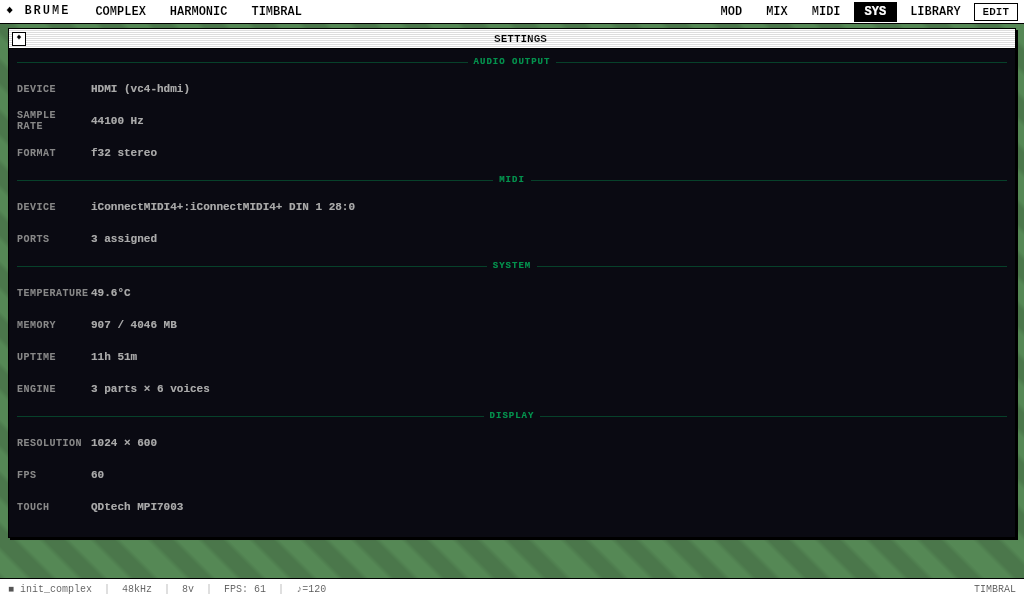
The SYS page is Brume’s diagnostic and configuration surface. Every value on the page is read live from the running system — no hardcoded numbers. Plug in a different display, swap controllers, change sample rate, switch audio outputs, and SYS reflects it immediately. Sections are accent-colored: green = audio, cyan = MIDI, orange = system, magenta = display.
AUDIO OUTPUT
The audio-output section picks where Brume’s master mix lands. Brume enumerates every ALSA card on the device — the USB Meridian gadget, the HDMI output through the touchscreen speakers, any DAC hat, plus any USB audio interface plugged into a USB-A port — and renders one row per detected output. The active device shows in the section accent color with a filled dot and an "ACTIVE" label; alternate devices render below as tappable "OPTION" rows. Tapping an option tears down the current audio stream and reopens on the chosen device with a brief (~100–200 ms) silence gap. The choice persists to ~/.brume/settings.json and is restored at startup.
Below the device list, the CHANNELS block is the on-device reference for how Brume’s eight Meridian stems map to the spatial-position labels Apple’s class-compliant UAC2 driver displays in the DAW:
| Channel pair | Brume part — DAW spatial label |
|---|---|
| 1–2 | • Complex — Front L / R |
| 3–4 | • Harmonic — Front Center / LFE |
| 5–6 | • Timbral — Back L / R |
| 7–8 | • Granular — Front L / R of Center |
Use this in the DAW to figure out which incoming spatial-labeled channel is which Brume part, or as a reference when you do a one-time DAW-side rename of the channels to "Complex", "Harmonic", etc. (Bitwig, Logic, Ableton, Reaper all support persistent channel renaming).
SAMPLE RATE shows the actual rate the audio backend opened the device at — 48 000 Hz on Meridian, HDMI, and any modern audio interface. FORMAT shows the engine’s internal sample format.
MIDI
DEVICE shows the connected MIDI input by its OS-reported name (e.g. nanoKONTROL2). PORTS lists every MIDI port currently feeding the engine, joined with " + " when multiple sources are attached — a USB control surface and Meridian’s f_midi endpoint commonly run side by side. With no MIDI device connected, both rows show “—”.
SYSTEM
Hardware diagnostics for the CM5 reference platform. TEMPERATURE reads from the CM5 thermal sysfs and updates once per second. MEMORY shows the in-use resident memory for the Brume process. UPTIME is system uptime since boot. ENGINE reports the configured polyphony layout (4 parts × 6 voices = 24 total).
DISPLAY
RESOLUTION is detected from the connected monitor at startup via GDK and used to compute the auto-fit zoom level — Brume is canvas-designed against a 1024×600 logical resolution and auto-scales to whatever panel you plug in (the reference 1920×1200 touchscreen runs at scale 1.875). FPS shows the animation frame-rate cap. TOUCH reads the connected touch input device’s OS-reported name — useful when troubleshooting input issues or confirming the touchscreen probed correctly at boot.
BRUME_UI_SCALE=2.0 in the environment before launching Brume. SYS’s RESOLUTION row still shows the panel’s native size; the override only affects the UI zoom multiplier.
Extending Brume with Lua
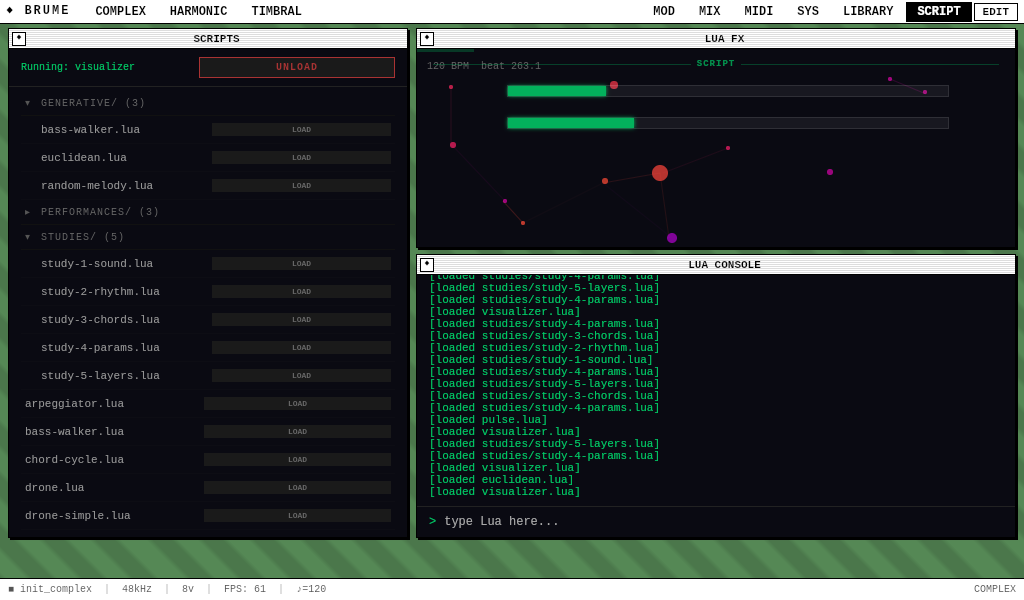
Brume embeds a Lua 5.4 scripting engine that enables users to write custom control scripts, generative sequencers, and audio effects. Scripts are loaded from the ~/brume/scripts/ directory and managed through the SCRIPT page, which provides a browser for loading and unloading scripts, a parameter panel for Lua-defined audio effects, and an interactive console for direct Lua evaluation.
The scripting system operates at three levels. Control scripts respond to musical events and manipulate Brume's parameters in real time — generating arpeggios, cycling through chord progressions, or slowly evolving a drone. Sequencer scripts emit note and parameter events on the transport clock, enabling generative patterns and algorithmic composition. Audio effect scripts define custom signal processing using DSP primitives exposed from the Rust engine, running as insertable slots in the effects chain.
scripts/harmonic-knobs.lua ships as a reference: the nanoKONTROL2’s top-row knobs 1–8 drive the Harmonic engine’s eight harmonic levels directly, ignoring channel routing in favor of explicit per-part targeting. All MIDI input ports feed scripts in parallel, so a USB control surface and Meridian’s f_midi endpoint both reach on_cc simultaneously without any routing setup.
API Reference
All scripts have access to the brume table, which provides functions for controlling the instrument:
| Function | Description |
|---|---|
| brume.set_param(part, name, value) | Set any of the 62 synthesis parameters on a part. Parameter names match the UI labels (e.g. FmIndex, FilterCutoff, Timbre, HarmonicLevel1, GranularPosition). |
| brume.note_on(part, note, velocity) | Trigger a MIDI note on a part. Note is 0–127, velocity is 0.0–1.0. |
| brume.note_off(part, note) | Release a MIDI note on a part. |
| brume.all_notes_off(part) | Release all active notes on a part. |
| brume.set_volume(value) | Set the master volume (0.0–1.0). |
| brume.set_part_level(part, level) | Set a part's mixer level (0.0–1.0). |
| brume.set_fx(slot, param, value) | Control an FX slot parameter. Slot names: "Saturator", "Chorus", "Delay", "Reverb", or any loaded Lua FX name. |
| brume.set_tempo(bpm) | Set the internal clock BPM (20–300). |
| brume.bpm() | Returns the current BPM. |
| brume.beat() | Returns the current beat position (fractional). |
| brume.clear_modulation(part) | Remove all modulation assignments on a part, giving the script full parameter control. |
| brume.schedule(beat, fn) | Call a function at an absolute beat position. |
| brume.after(beats, fn) | Call a function after a number of beats from now. |
Music helpers:
| Function | Description |
|---|---|
| brume.chord(root, type) | Returns a table of MIDI notes for a chord. Types: "maj", "min", "maj7", "min7", "dom7", "dim", "aug", "sus2", "sus4", "9". |
| brume.scale(root, intervals) | Returns a table of MIDI notes from a root and interval table. |
| brume.midi_to_freq(note) | Converts a MIDI note number to frequency in Hz. |
| note.C4, note.A4, note.Fs3 ... | Named constants for all MIDI note numbers. |
| brume.COMPLEX / HARMONIC / TIMBRAL / GRANULAR | Part index constants (0, 1, 2, 3). |
Callbacks
Scripts define global functions that Brume calls at appropriate moments. All callbacks are optional — define only those you need:
| Callback | When Called |
|---|---|
| init() | Once when the script is loaded. Set up parameters, play initial notes, create DSP objects. |
| on_beat(beat) | On each integer beat boundary. The beat argument is the current fractional beat position. |
| on_tick(beat) | Every 50ms (~20Hz). For smooth parameter modulation and continuous control. |
| on_note(part, note, vel) | When a MIDI note is received from the touch keyboard or hardware MIDI. Velocity of 0 indicates note-off. |
| on_cc(part, cc, value) | When a MIDI CC is received. Value is normalized 0.0–1.0. |
| cleanup() | Called when the script is unloaded. Release notes, reset parameters. |
on_beat will stop and start with the external transport.
cleanup() on the old version and init() on the new one.
DSP Primitives
Scripts have access to the dsp table, which provides factory functions for creating real-time audio processing objects backed by the same Rust DSP library that powers Brume's built-in engines:
| Factory | Methods | Description |
|---|---|---|
| dsp.delay(max) | :process(in), :set_time(samples), :reset() | Delay line with linear interpolation. |
| dsp.allpass(max, gain) | :process(in), :set_time(samples), :set_gain(g), :reset() | Schroeder allpass filter for reverb diffusion. |
| dsp.lowpass(cutoff) | :process(in), :set_cutoff(hz), :reset() | One-pole lowpass filter. |
| dsp.highpass(cutoff) | :process(in), :set_cutoff(hz), :reset() | One-pole highpass filter. |
| dsp.saturator() | :process(in), :set_drive(d), :set_type(t), :set_mix(m) | Waveshaping saturator (soft/hard/tape/tube). |
| dsp.wavefolder() | :process(in), :set_drive(d), :set_stages(n) | Triangle wavefolding distortion. |
| dsp.sample_rate | — | The current audio sample rate (e.g. 44100 or 48000). |
Audio Effects
Lua scripts can define audio effects that run in the FX chain alongside the built-in Saturator, Chorus, Delay, and Reverb. Effect scripts are placed in ~/brume/scripts/fx/ and loaded through the AUDIO EFFECTS section of the SCRIPT page. Each effect defines a global fx table with a name, parameter definitions, an init function, and a process function that receives and returns stereo audio buffers:
When loaded, the effect appears in the LUA FX panel with sliders for each defined parameter. Parameters are controllable from the touchscreen and can be CC-mapped to hardware MIDI controllers. The effect's mix value controls the dry/wet blend — at 0 the effect is bypassed, at 1 the output is fully wet.
Screen Drawing
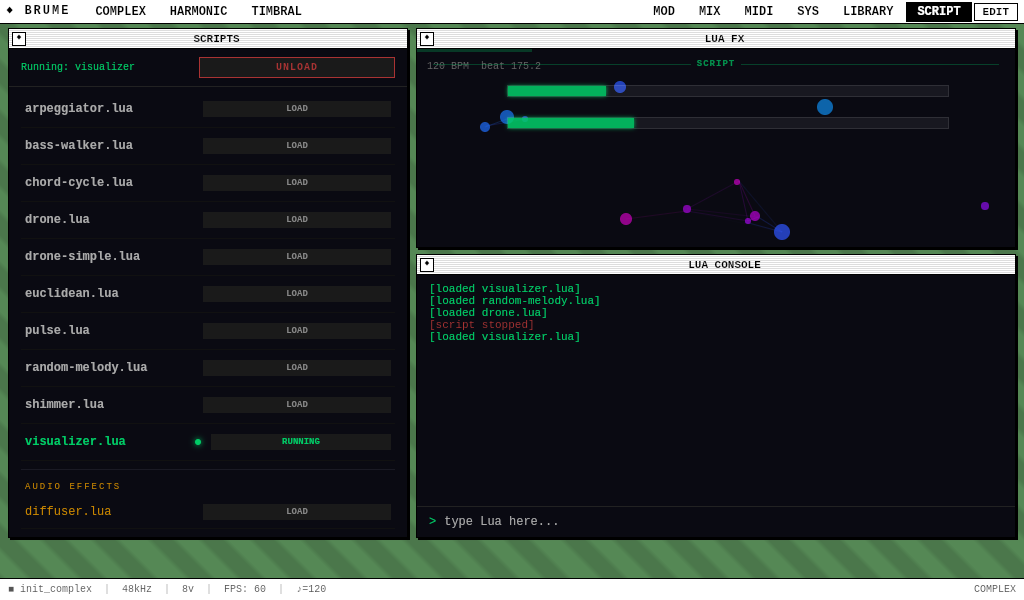
The screen module provides a canvas drawing API for custom visualizations, pattern editors, and interactive displays. Drawing commands are batched and rendered at 20fps in the LUA FX panel. The API covers lines, rectangles, circles, text, paths, color, and line width — enough to build anything from simple meters to complex generative graphics.
| Function | Description |
|---|---|
| screen.clear() | Clear the canvas to black. |
| screen.color(r, g, b, a) | Set drawing color (0–255 per channel, alpha optional). |
| screen.line(x1, y1, x2, y2) | Draw a line between two points. |
| screen.rect(x, y, w, h) | Draw a rectangle outline. |
| screen.fill_rect(x, y, w, h) | Draw a filled rectangle. |
| screen.circle(x, y, r) | Draw a circle outline. |
| screen.fill_circle(x, y, r) | Draw a filled circle. |
| screen.text(x, y, str) | Draw text at a position. |
| screen.pixel(x, y) | Draw a single pixel. |
| screen.line_width(w) | Set stroke width. |
| screen.font_size(size) | Set font size in pixels. |
| screen.update() | Flush drawing commands to the display. |
Coroutine Clock
The clock module provides coroutine-based musical timing inspired by the monome norns clock system. Instead of responding to callbacks, musicians write sequential code that reads top-to-bottom, with clock.sync() pausing execution for a musical duration:
Multiple coroutines can run simultaneously — a common pattern is one for bass, one for melody, and one for chords. Each runs independently on the transport clock and pauses when the DAW sends MIDI Stop.
| Function | Description |
|---|---|
| clock.run(fn) | Launch a coroutine on the transport clock. Returns an ID for cancellation. |
| clock.sync(beats) | Yield for a musical duration. 1 = whole note, 1/4 = quarter, 1/8 = eighth. |
| clock.sleep(seconds) | Yield for wall clock time (not synced to tempo). |
| clock.cancel(id) | Stop a specific coroutine. |
| clock.cancel_all() | Stop all running coroutines. |
| clock.get_tempo() | Returns the current BPM. |
| clock.set_tempo(bpm) | Set the transport BPM. |
Script Parameters
Any script can expose tuneable controls in the UI by calling brume.add_param() during init(). Parameters appear as sliders in the LUA FX panel on the SCRIPT page, and their values can be read at any time with brume.get_param_value():
Script parameters are cleared when the script is unloaded. They can also be CC-mapped to hardware MIDI controllers through the FX tab in the CC MAPPING window.
Studies
Brume ships with progressive tutorial scripts in the scripts/studies/ directory. Each study makes sound immediately on load and teaches one concept through commented, modifiable code:
| Study | Concept | What It Does |
|---|---|---|
| Study 1: Sound | brume.note_on | Plays a single note. One line makes sound. |
| Study 2: Rhythm | clock.run / clock.sync | A sequential rhythm with quarter and eighth notes. |
| Study 3: Chords | brume.chord() | A chord progression: Cmaj7 → Am7 → Fmaj7 → G7. |
| Study 4: Control | brume.add_param | A melody with UI sliders for brightness, FM, and speed. |
| Study 5: Layers | Multiple engines | Three concurrent coroutines: pad + melody + bass across all engines. |
| Study 6: Effects | brume.set_fx() | A melody with controllable reverb, delay, and saturation via UI sliders. |