
User Guide
Impulse Cycler is a motion-first transient shaping effect that combines level-independent transient detection with synthetic transient layering. Shape attacks and sustains, layer new synthetic transients, and assign tempo-synced LFO modulation to nine key parameters.
Installation & Formats
Impulse Cycler v1.0.0 is a free audio effect plugin. It ships as AU and VST3 on macOS, and as VST3 on Windows and Linux.
macOS
Run the .pkg installer from the downloads page. It installs the AU component for Logic Pro and other Audio Unit hosts, plus the VST3 bundle for VST3-compatible hosts.
Windows
Use the VST3 installer for the normal path, or use the VST3 ZIP as a manual install fallback. The Windows installer is unsigned, so Windows may show a trust warning before installation.
Linux
Extract the x86-64 tarball and copy Impulse Cycler.vst3 to your user or system VST3 folder, then rescan plugins in your host.
Quick Start
Get up and running with Impulse Cycler in five steps:
- Load Impulse Cycler as an audio effect on a drum or percussive track
- Adjust Attack to boost or soften transients
- Adjust Sustain to extend or shorten the body
- Optionally enable a synth engine and raise Level to layer synthetic transients
- Enable motion on supported parameters for tempo-synced modulation
What Impulse Cycler Does
Impulse Cycler transforms static transient shaping into a dynamic, performable effect. The core TransientCore technology uses dual envelope followers to detect and shape transients without requiring threshold settings — it works consistently on both quiet and loud material. Layer synthetic transients from 7 different engines, then add cyclical motion to supported parameters for continuously evolving textures.
Typical Use Cases
- Drum enhancement — Add punch and snap to kicks, snares, and toms
- Transient softening — Tame harsh attacks on percussion
- Synthetic layering — Add clicks, pings, or noise bursts to drum hits
- Evolving textures — Motion-modulated parameters create rhythmic variation
- Sound design — Transform percussive sources into evolving timbres
Signal Flow
Audio flows through four main stages. The motion system can modulate parameters at any stage, with modulation depth scaled by an envelope follower that responds to input dynamics.
                           IMPULSE CYCLER
       ┌──────────────────────────────────────────────────────────────┐
       │                                                              │
       │   ┌──────────────┐    ┌──────────────┐    ┌───────────┐      │
Input ▶│   │ TransientCore│───▶│    Body      │───▶│  Output   │     ▶│ Output
       │   │              │    │  Processing  │    │   Stage   │      │
       │   │ Attack       │    │              │    │           │      │
       │   │ Sustain      │    │ Gain, Tilt   │    │ Mix, Gain │      │
       │   │              │    │ Damping      │    │           │      │
       │   └──────┬───────┘    └──────────────┘    └─────┬─────┘      │
       │          │                                      │            │
       │          │ onset                                │            │
       │          ▼                                      │            │
       │   ┌──────────────┐                              │            │
       │   │   Synth      │──────────────────────────────┘            │
       │   │   Layer      │                                           │
       │   │              │                                           │
       │   │ 7 Engines    │                                           │
       │   └──────────────┘                                           │
       │          ▲                                                   │
       │          │                                                   │
       │   ┌──────┴───────┐                                           │
       │   │   Motion     │◀── Envelope Follower (scales depth)       │
       │   │   LFOs       │                                           │
       │   └──────────────┘                                           │
       └──────────────────────────────────────────────────────────────┘
The envelope follower tracks input dynamics and scales LFO modulation depths above a baseline motion floor:
- Loud input: High envelope → full motion depth
- Quiet input: Low envelope → subtler baseline motion
GUI Overview
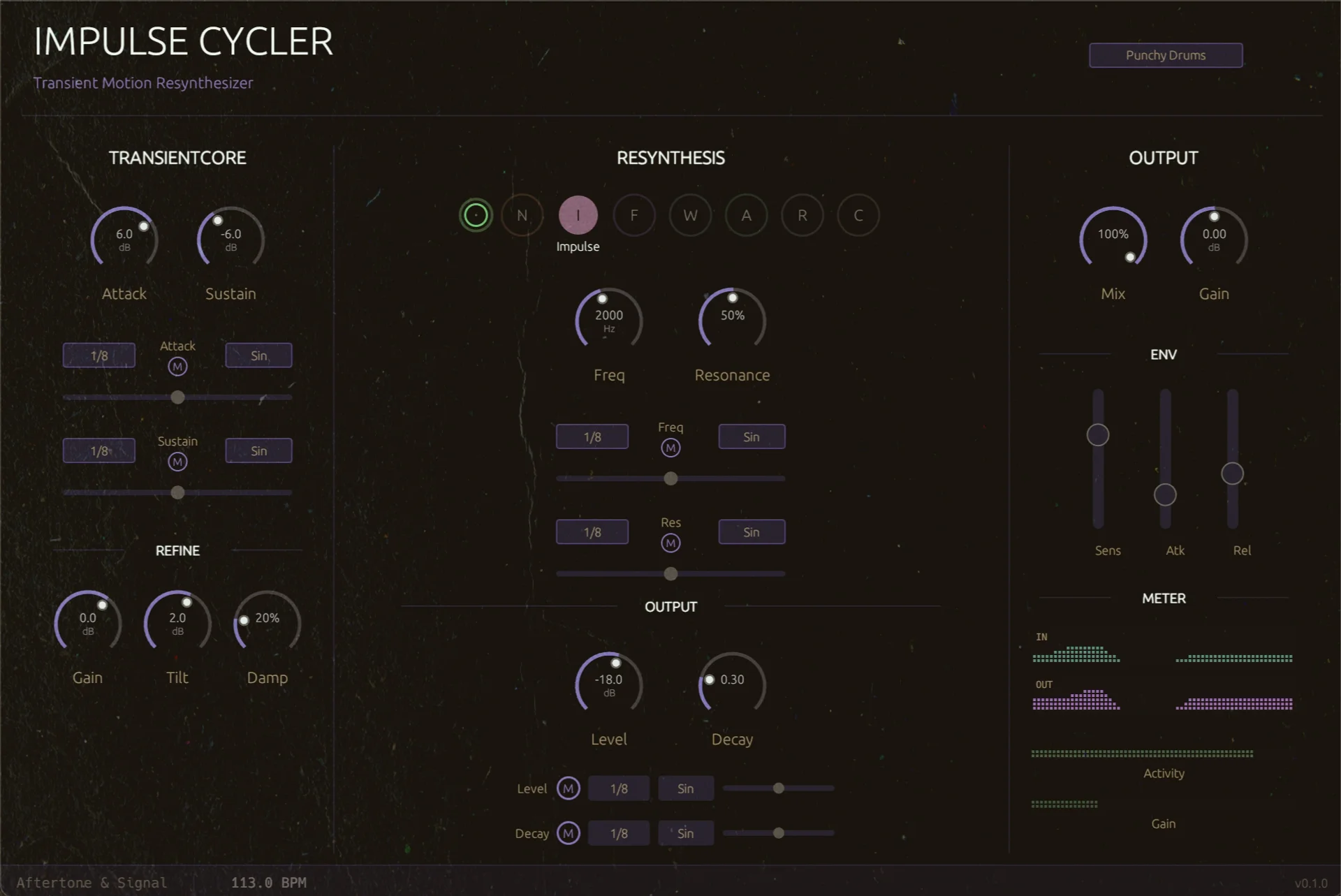
Impulse Cycler's interface is organized into three main columns. Understanding the layout helps you navigate quickly.
TransientCore (Left)
The foundation. Attack and Sustain knobs shape the transient character. Below them, the Refine section provides Body Gain, Tilt, and Damping controls for extended processing.
Resynthesis (Center)
Synthetic transient generation. Select from 7 engines using the engine circles. Param A and Param B change based on the selected engine. Level and Decay control the synth output.
Output (Right)
Final stage. Mix blends dry and wet signals. Gain adjusts output level. The ENV section controls how dynamics affect motion depth. The METER section shows LED-style input/output meters with transient and gain-change overlays.
TransientCore
TransientCore is the foundation of Impulse Cycler. It uses dual envelope followers (fast and slow) to detect and shape transients without requiring threshold settings. This level-independent approach works consistently on both quiet and loud material.
Attack & Sustain
Attack (-15 to +15 dB)
Controls the transient attack portion of the signal:
- Positive values: Boost transients for more punch and snap
- Negative values: Soften transients for smoother attacks
- 0 dB: No change to attack
Sustain (-24 to +24 dB)
Controls the sustain/body portion of the signal:
- Positive values: Extend and boost the sustain phase
- Negative values: Shorten and reduce the sustain
- 0 dB: No change to sustain
Body Processing (Refine)
Extended processing for the shaped signal, found in the "refine" section below the main knobs.
Body Gain (-24 to +12 dB)
Additional level control for the body of the signal, applied after TransientCore shaping.
Body Tilt (-12 to +12 dB)
Spectral tilt control:
- Positive values: Boost high frequencies, brighter body
- Negative values: Boost low frequencies, darker body
Damping (0-100%)
Progressive high-frequency absorption. Higher values apply more high-frequency damping over time, useful for creating warmer, more natural-sounding sustains.
Synth Layer (Resynthesis)
The synthesis layer generates synthetic transients triggered by detected onsets. This allows you to layer additional character on top of the shaped signal.
Global Synth Controls
Level (-60 to +12 dB)
Output level of the synth layer. At -60 dB (minimum), the synth is effectively off. Raise this to blend synthetic transients with your shaped signal.
Decay (0.1-1.0)
Envelope decay rate for most synth engines. Higher values produce longer tails; lower values create shorter, punchier transients. The Impulse engine is also strongly shaped by its Resonance control.
Engine-Specific Parameters
Each engine exposes context-specific controls. Most engines use Param A and Param B; Noise uses a single Duration control.
Synth Engines
Impulse Cycler includes 7 synthesis engines, each creating a different type of synthetic transient.
Noise
Shaped noise burst for clicks, snaps, and breath textures.
- Duration (5-500 ms): Length of the noise burst
Impulse
Resonant filtered impulse for tonal pings and clicks.
- Freq (100-10000 Hz): Filter frequency
- Resonance (0-99%): Filter resonance
FM
FM synthesis for metallic, bell-like transients.
- Ratio (0.5-16): Frequency ratio between carrier and modulator
- Index (0-10): Modulation depth
Waveshape
Waveshaping distortion for aggressive, punchy transients.
- Drive (1-20): Distortion intensity
- Tone (0-100%): Balance between noise and pitched content
Additive
Additive synthesis for bell-like, chime transients.
- Brightness (0-100%): Harmonic content (0=fundamental only)
- Inharmonicity (0-100%): Stretches harmonics for metallic tones
Air
Bandpass-filtered noise for sizzle, air, and cymbal-like textures.
- Freq (100-8000 Hz): Center frequency
- Bandwidth (0-100%): Filter width (0=narrow/resonant, 100=wide/airy)
Click
Punchy click/pluck with pitch sweep.
- Pitch (50-500 Hz): Starting pitch
- Sweep (0-100%): Amount of pitch drop (0=none, 100=full octave)
Engine Cycling
Engine cycling automatically changes the synth engine on each transient trigger, creating variation across hits.
Cycle Modes
Sequential
Cycles through engines in order: Noise → Impulse → FM → Waveshape → Additive → Air → Click → Noise...
Random
Picks a random engine on each trigger for unpredictable variation.
Ping-Pong
Cycles forward then backward: Noise → ... → Click → ... → Noise
Cycle Hold
Controls how many triggers before changing to the next engine:
- 1: Change engine on every trigger
- 2: Change every 2 triggers
- 4: Change every 4 triggers
- 8: Change every 8 triggers
Motion System
The motion system adds tempo-synced LFO modulation to parameters, creating continuously evolving textures. Motion depth is scaled by an envelope follower that responds to input dynamics — modulation becomes more pronounced during loud sections while quieter passages retain a subtler baseline motion.
Modulatable Parameters
9 parameters can have motion applied:
- Attack (TransientCore)
- Sustain (TransientCore)
- Body Gain (Refine)
- Body Tilt (Refine)
- Damping (Refine)
- Synth Level
- Synth Decay
- Engine Param A (context-dependent)
- Engine Param B (context-dependent)
Motion Parameters
Each modulatable parameter has four motion controls:
Enable (On/Off)
Toggle motion modulation for this parameter.
Rate (Tempo-synced)
LFO cycle speed, synced to host tempo when the host provides BPM. If no host tempo is available, Impulse Cycler uses 120 BPM as a fallback:
- 4 bars — Slowest, subtle long-term movement
- 2 bars, 1 bar — Medium sweeps
- 1/2, 1/4 — Quarter/half note cycles
- 1/8, 1/16, 1/32 — Faster rhythmic motion
- Triplets (1/4T, 1/8T, 1/16T) — Triplet divisions
- Dotted (1/4D, 1/8D) — Dotted note divisions
Depth (0-100%)
Maximum modulation amount. This is scaled by the envelope follower output and the built-in baseline motion floor, so actual depth varies with input dynamics without disappearing completely on quieter material.
Shape
LFO waveform:
- Sine — Smooth, organic motion
- Triangle — Linear, symmetrical sweeps
- Saw — Rising ramp with instant reset
- Square — Alternating between extremes
- S&H — Random sample-and-hold steps
Envelope Follower (ENV)
The envelope follower tracks input dynamics and controls how strongly motion responds to the source. This creates dynamics-responsive modulation — motion is more pronounced during loud passages and subtler during quiet ones.
Sensitivity (0-100%)
How much input level lifts motion above the baseline floor:
- 0%: Motion uses the steady baseline amount set by each lane's Depth
- 100%: Motion responds most strongly to input dynamics
Attack (1-100 ms)
How quickly the envelope responds to transients. Lower values react faster to hits.
Release (10-500 ms)
How quickly the envelope falls after transients. Longer releases create more sustained motion.
Presets
Factory Presets
Impulse Cycler includes factory presets as starting points:
Init
Neutral starting point with all parameters at default. No shaping, synth off.
Punchy Drums
Enhanced transients with boosted attack, reduced sustain, and a subtle impulse layer. Great for adding snap to kicks and snares.
Snap Gate
Strong attack enhancement with a short sustain profile. Useful for tightening drum loops without adding a synthetic layer.
Soft Lift
Gentle sustain lift and a blended Air layer for making quiet details feel more present without overwhelming the source.
Click Trace
Short click-layer preset for adding fine transient definition to pops, glitches, percussion, and small drum-machine hits.
FM Knock
FM-layered transient body for rounder knocks, tom-like hits, and percussive material that needs a little synthetic weight.
Dust Machine
Noise-layer preset with subtle motion for adding grain, smear, and machine-like variation to short transient material.
Cycle Sketch
Engine-cycling preset that rotates synthetic transient colors and adds motion to synth engine parameters.
Evolving Texture
Motion-heavy preset with Air engine and multiple LFOs enabled. Creates continuously evolving textures that respond to playing dynamics.
User Presets
Save your own configurations using the Library system in the plugin header. The preset dropdown groups factory and user presets, Save prompts for a preset name, and Load opens an .impulse-cycler preset file from disk.
Preset Storage Location:
- macOS:
~/Library/Application Support/Aftertone & Signal/Impulse Cycler/Presets/ - Windows:
%APPDATA%/Aftertone & Signal/Impulse Cycler/Presets/ - Linux:
~/.config/aftertone-and-signal/impulse-cycler/presets/
Output Controls
Mix (0-100%)
Dry/wet blend between the original signal and the processed signal:
- 0%: Fully dry (original signal only)
- 100%: Fully wet (processed signal only)
Output Gain (-12 to +12 dB)
Final output level adjustment. Use this to match levels with the bypassed signal.
Tips & Techniques
Start with TransientCore
- Begin with Attack and Sustain adjustments before adding synth layers
- Boost attack for punch, reduce sustain for tighter drums
- Use negative attack values to soften harsh transients
Subtle Synth Layering
- Keep synth Level low (-18 to -12 dB) for blended results
- Use Impulse or Click engines for additional attack definition
- Air engine adds high-frequency sizzle to cymbals and hats
Rhythmic Motion
- Enable motion on Attack at 1/8 or 1/16 for varying punch
- Use Square shape for alternating between two states
- S&H shape creates randomized variation on each cycle
Dynamics-Responsive Effects
- Set ENV Sensitivity high (70-100%) for dynamics-aware motion
- Fast attack (5-10ms) makes motion respond to individual hits
- Slow release (200-400ms) creates sustained modulation phrases
Sound Design
- Use FM engine with high Index for metallic, bell-like transients
- Additive with high Inharmonicity creates gamelan-like tones
- Enable Engine Cycling for evolving, unpredictable textures
Parallel Processing
- Use Mix at 50% to blend processed and original signals
- This preserves original character while adding enhancement
- Particularly useful for synth layering without overwhelming the original
Parameter Reference
TransientCore Parameters
| Parameter | Range | Default | Description |
|---|---|---|---|
| Attack | -15 to +15 dB | 0 dB | Transient attack boost/cut |
| Sustain | -24 to +24 dB | 0 dB | Sustain phase boost/cut |
Body Processing Parameters
| Parameter | Range | Default | Description |
|---|---|---|---|
| Body Gain | -24 to +12 dB | 0 dB | Additional body level |
| Body Tilt | -12 to +12 dB | 0 dB | Spectral tilt (low/high emphasis) |
| Damping | 0-100% | 0% | High-frequency damping |
Synth Parameters
| Parameter | Range | Default | Description |
|---|---|---|---|
| Engine | Noise/Impulse/FM/Waveshape/Additive/Air/Click | Noise | Synth engine selection |
| Level | -60 to +12 dB | -60 dB | Synth output level |
| Decay | 0.1-1.0 | 0.5 | Envelope decay rate |
| Engine Cycle | On/Off | Off | Enable engine cycling |
| Cycle Mode | Sequential/Random/Ping-Pong | Sequential | How engines cycle |
| Cycle Hold | 1/2/4/8 | 1 | Triggers before engine change |
Engine-Specific Parameters
| Engine | Parameter | Range | Description |
|---|---|---|---|
| Noise | Duration | 5-500 ms | Noise burst length |
| Impulse | Freq | 100-10000 Hz | Resonator frequency |
| Impulse | Res | 0-99% | Resonator emphasis and ring |
| FM | Ratio | 0.5-16 | Carrier/modulator ratio |
| FM | Index | 0-10 | FM modulation amount |
| Waveshape | Drive | 1-20 | Waveshaper drive |
| Waveshape | Tone | 0-100% | Waveshaper tone balance |
| Additive | Brightness | 0-100% | Harmonic brightness |
| Additive | Inharmonicity | 0-100% | Harmonic stretch for metallic tone |
| Air | Freq | 100-8000 Hz | Bandpass centre frequency |
| Air | Bandwidth | 0-100% | Bandpass width |
| Click | Pitch | 50-500 Hz | Click starting pitch |
| Click | Sweep | 0-100% | Pitch drop amount |
Output Parameters
| Parameter | Range | Default | Description |
|---|---|---|---|
| Mix | 0-100% | 100% | Dry/wet blend |
| Output Gain | -12 to +12 dB | 0 dB | Final output level |
Envelope Follower Parameters
| Parameter | Range | Default | Description |
|---|---|---|---|
| Sensitivity | 0-100% | 50% | Input level → motion depth lift above baseline |
| Attack | 1-100 ms | 10 ms | Envelope attack time |
| Release | 10-500 ms | 100 ms | Envelope release time |
Motion Parameters (per modulatable parameter)
| Parameter | Range | Default | Description |
|---|---|---|---|
| Enable | On/Off | Off | Toggle motion for this parameter |
| Rate | 4 bars to 1/32 plus triplet/dotted divisions | 1/8 | Tempo-synced LFO rate |
| Depth | 0-100% | 50% | Maximum modulation amount |
| Shape | Sine/Triangle/Saw/Square/S&H | Sine | LFO waveform |
Impulse Cycler v1.0.0
Aftertone & Signal
aftertone.co